
Brightness Sensor
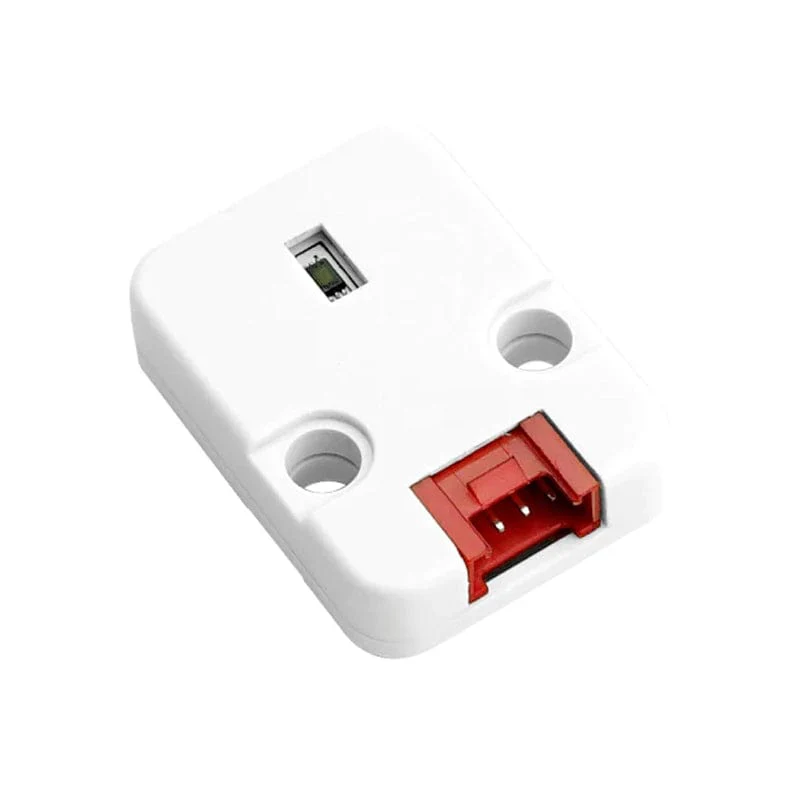
| SKU | P-3RD-BS |
|---|---|
| Product line | PIERRE Pro, Third-party |
| Category | Sensors / Brightness sensors |
| Manufacturer | Comet / farmel /mauser-a |
| GTIN / EAN | 8606034721021 |
| HS code | 9031808000 |
Overview
The Brightness Sensor delivers accurate brightness readings in lux, enabling intelligent control of lighting and environmental systems. Using the BH1750FVI-TR sensor, it offers a wide measurement range with high resolution, ensuring dependable performance in varying lighting conditions.
Its I²C interface simplifies connectivity, allowing seamless integration into microcontroller-based systems such as Arduino, ESP32, and M5Stack platforms. The compact module design, with mounting holes and a reliable connector, supports flexible installation in diverse projects.
With low power consumption and high stability, the Light Unit is suitable for smart lighting, automatic brightness adjustment, and environmental monitoring systems, making it an essential component for modern IoT and automation solutions.
Key features
- Voltage: 5V DC
- Current: up to 143µA
- Sensor: BH1750FVI-TR
- Measurement Range: 1-65535lx
- Interface: I2C Interface, HY2.0-4P Connector
- Dimension: 32 x 24 x 8
- Weight: 10g
Electrical & I/O
| Operating voltage | 5 V |
|---|
Pin layout
| Pin | Label | Type | Position |
|---|---|---|---|
| 1 | 5V+ | 5V_pwr_in | top |
| 2 | GND | power_gnd_in | top |
| 3 | SCL | scl | top |
| 4 | SDA | sda | top |
Physical & packaging
| Dimensions (L × W × H) | 32 × 24 × 8 mm |
|---|---|
| Weight | 10 g |
| Box dimensions (L × W × H) | 91 × 10 × 140 mm |
| Box weight | 11 g |
User manual
1. Product Description
PIERRE brightness sensors are recommended, while compatible third-party sensors such as the BH1750 can also be used. The brightness sensor measures the ambient light level at its location, and this value can be used as a condition for lighting, blind, and other automations.
Connection
The sensor connects to the controller using a standard CAT6 cable.
It is configured in the PIERRE Partner application.
Keep the sensor cable separated from mains wiring.
For outdoor installations, use an outdoor-rated cable and suitable cable gland.
What It Is Used For
Switching or dimming lighting based on the actual light level instead of a fixed time.
Controlling blinds according to the amount of incoming light.
Switching outdoor lighting based on the actual daylight level, automatically adapting to seasonal changes.
Combining the light level with a schedule, motion sensor, or presence sensor to create more advanced automation conditions.
Sensor Placement
Sensor placement is important for accurate and reliable operation.
Do not point the sensor directly at a light source that it controls. This can create a feedback loop where the light switches on, the sensor detects the increased brightness, and the light switches off again.
For outdoor installations, mount the sensor facing north, away from direct sunlight and any controlled light source.
For more stable operation around dusk, use separate switch-on and switch-off thresholds to prevent the lighting from repeatedly switching on and off around a single light level.
2. What you need
Wired. Needs a PIERRE PRO or LITE Controller with two free Configurable I/O (digital) pins for SDA and SCL, plus the Brightness sensor (BH1750). The sensor takes 5 V from the controller.
3. Wiring
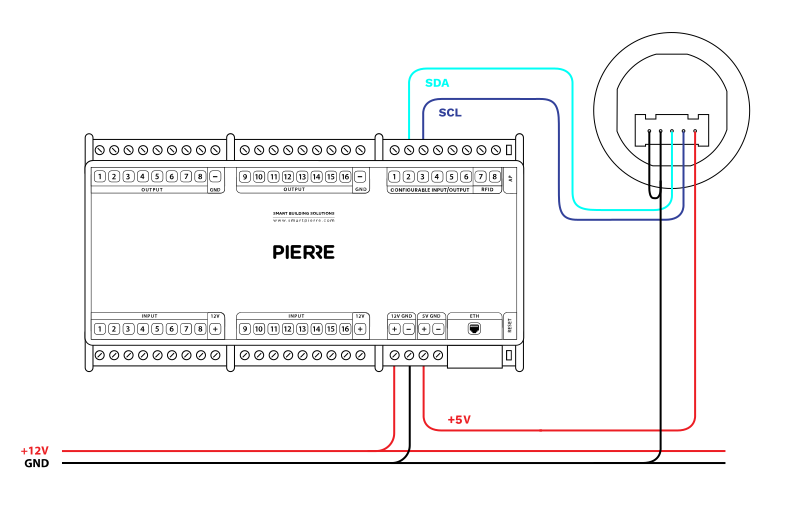
Wiring Compatible Brightness sensor in PIERRE smart home system - Electric schemes
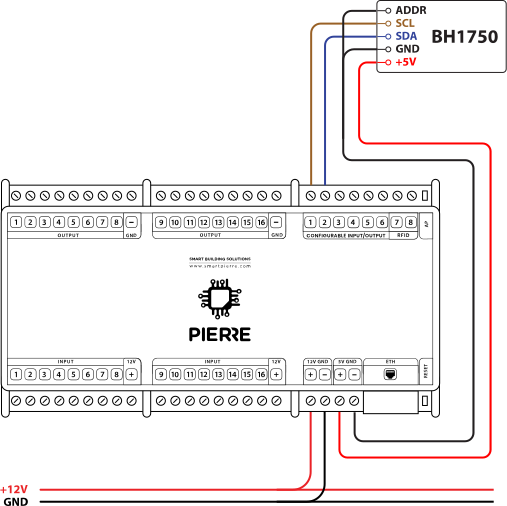
Brightness sensor BH1750 - Electric schemes
| Run | Wires | Cross-section | Cable type | Conductors |
|---|---|---|---|---|
| From BH1750 to PIERRE | 4 | 0.26 mm² (23 AWG) | Cat 6 S/FTP | +5 V, GND, SCL, SDA |
4. Video
BH1750 brightness sensor: wiring and configuration, part 1. https://www.youtube.com/watch?v=gnYVwWbrPKE
BH1750 brightness sensor: wiring and configuration, part 2. https://www.youtube.com/watch?v=8VsVKJ817mc
5. FAQ
Q1: What do the controller LED colours mean?
Green – online and connected. Red – offline, no network or no internet. Light blue – AP mode, broadcasting its own network for setup. Dark blue – AP mode managed through PIERRE Partner. Purple – searching for an IP address from the router. Orange – downloading a firmware update.
Q2: The sensor does not react in the app. What should I check first?
Check that the sensor has been added to the configuration in the PIERRE Partner application.
Q3: The sensor gives no reading. What do I check first?
Check GND, +5 V, SDA and SCL. The supply must be +5 V; reversed polarity damages the sensor.
Q4: How do I make sure the conductors are not swapped between PIERRE and the BH1750?
Trace them with an acoustic wire detector and tone generator.
Q5: Where does the address pin (ADDR) of the BH1750 go?
Connect it to GND.
Q6: The wiring looks right but there is still no reading. What else can I try?
Swap SDA and SCL.
Q7: Can other devices share the SDA and SCL pins?
No. Remove everything else and leave only the BH1750 on those Configurable I/O pins.
Q8: How do I check that the sensor is receiving power?
Measure between GND and +5 V at the sensor end. If there is no voltage, check the wiring.
Q9: What is the maximum cable length?
15 m. For longer runs use a differential (I2C extender) module.
Q10: When should input and output be on the same controller?
If one input influences an output, both should be added to the same controller. A motion sensor triggering a lamp, for example, performs best when both sit on the same controller.