
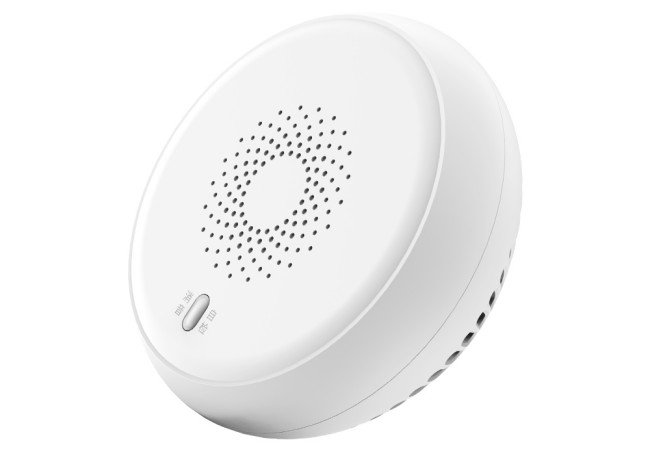
Smoke Detector
| SKU | PW-SNS-SMOKE |
|---|---|
| Product line | PIERRE Wave |
| Category | Sensors / Gas, Smoke, CO, Fire sensors |
| Manufacturer | RSHTech |
| Manufacturer SKU | RSH-Zigbee-GSSS01 |
| GTIN / EAN | 8606034720581 |
| HS code | 9027101000 |
Overview
The PIERRE Wave Smoke Detector provides accurate and early smoke detection, using photoelectric sensing technology to quickly identify fire hazards. It connects to the PIERRE Wave smart home system, ensuring users receive instant alerts via connected devices. With a sleek and compact design, it is easy to install on ceilings or walls. The detector operates on a DC power supply, supporting continuous monitoring, and features an audible alarm for immediate local notification. It is designed to function effectively within a temperature range suitable for various environments, adding an essential layer of safety.
Key features
Smoke detection, Alarm Sound >85 dB, photoelectric sensing, CR123A, real-time alerts, compact design.
Technical specifications
| Electrical | |
|---|---|
| Power Supply | CR123A Battery |
| Connectivity | |
| Connectivity | Zigbee |
| Communication Frequency | 2.4GHz |
| Physical | |
| Panel Material | ABS+PC material |
| Product Color | White |
| Environmental | |
| Operating Temperature (°C) | -10 - +55 |
| Operating Temperature | +14°F - +131°F |
| Operating Humidity | 10 - 90 % RH |
| Features | |
| Operation Range | 100 m |
| Sensors | |
| Built-in Sensors | Smoke |
Physical & packaging
| Dimensions (L × W × H) | 90 × 37 × 90 mm |
|---|---|
| Weight | 110 g |
| Box dimensions (L × W × H) | 95 × 45 × 95 mm |
| Box weight | 130 g |
User manual
- 1. Product Description
- 2. Product Size
- 3. Technical Specification
- 4. Steps before Instalment
- 5. Installation Precautions
- 6. Installation Method 1
- 7. Installation method 2
- 8. Installation checking
- 9. Fire Alarm Function
- 10. Alarm and Test
- 11. Routine Maintenance
- 12. System requirements
- 13. App-to-Device Pairing
- 14. FAQ
1. Product Description
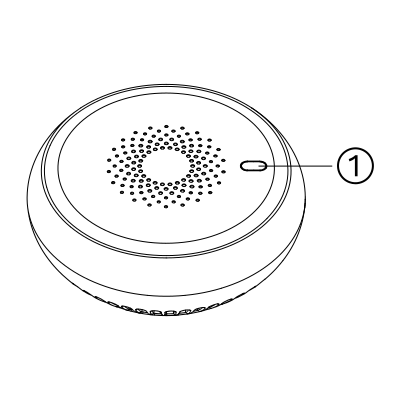
- Status Indicator
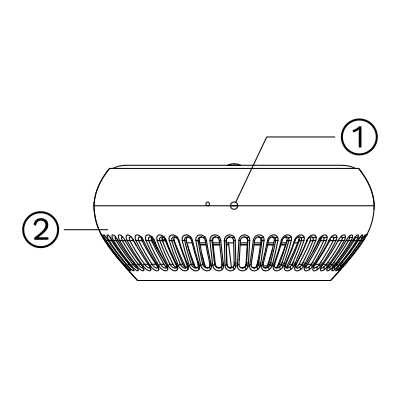
- Alignment mark
- Mounting base
2. Product Size
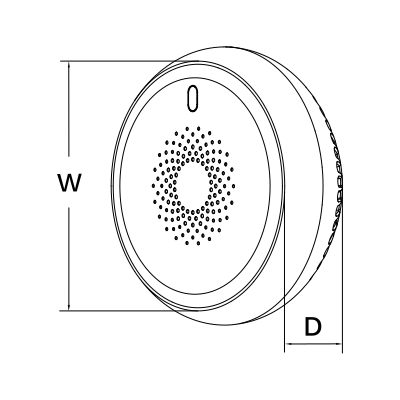
W: 90 mm
D: 37 mm
3. Technical Specification
4. Steps before Instalment
Before installing and configuring the sensor, please follow the steps below to ensure the device is correctly powered on and ready for use.
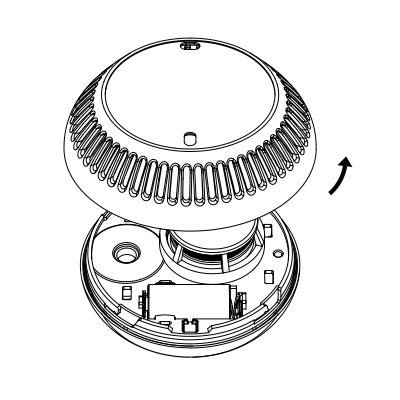
Rotate the mounting base anticlockwise to open
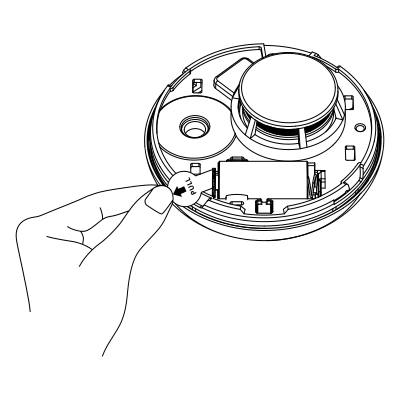
Remove battery insulation film
5. Installation Precautions
To ensure safe and reliable operation, please observe the following guidelines when installing the product:
- Mount the device only on indoor ceilings.
- Install the product at least 50 cm away from lighting fixtures.
- Do not install the product in bathrooms or other damp environments.
- Avoid placing the device in areas with non-fire smoke or steam.
- Ensure the installation environment temperature is within the range of –10°C to +55°C.
- If a cupboard is close to the ceiling, position the product at least 60 cm away from the cupboard.
- Keep a minimum distance of 150 cm from ventilators, air conditioners, and air vents.
- It is recommended to install the device using screws. If you use a 3M adhesive sticker, any product damage or safety issues that occur will be your responsibility.
- When using a 3M sticker, attach the product only to a smooth, dry, clean, and even surface.
- Regularly check that the product is securely attached to the surface to prevent it from falling.
- Do not mount the product onto the base unless the battery is properly installed.
- If affixed to a painted surface, note that peeling paint may cause the product to fall. In such cases, the user is responsible for any resulting damage or issues.
6. Installation Method 1
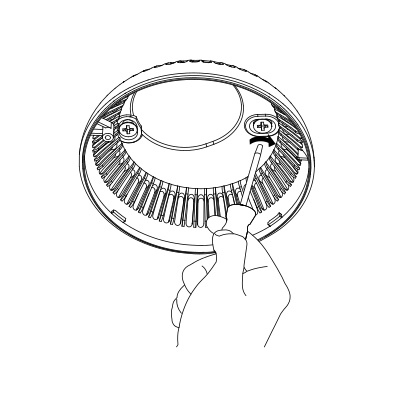
Use screws to fix the mounting base to the ceiling
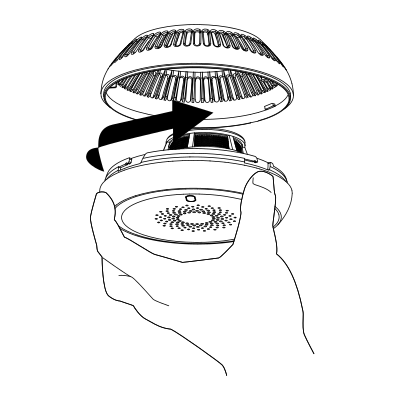
Rotate the product clockwise into the mounting base
7. Installation method 2
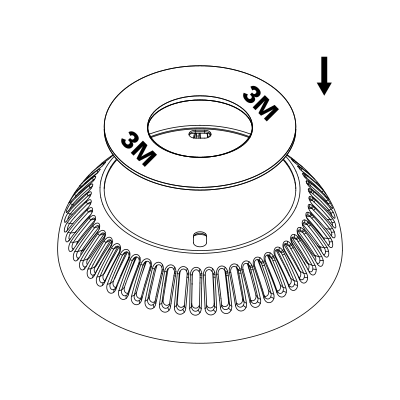
Remove protective film from the 3M sticker and attach the sticker to the mounting base
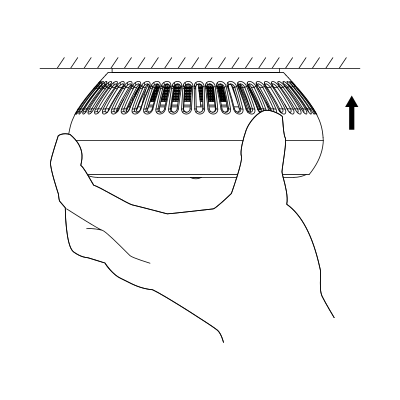
Remove the protective film from 3M sticker and attach the product to the ceiling
8. Installation checking
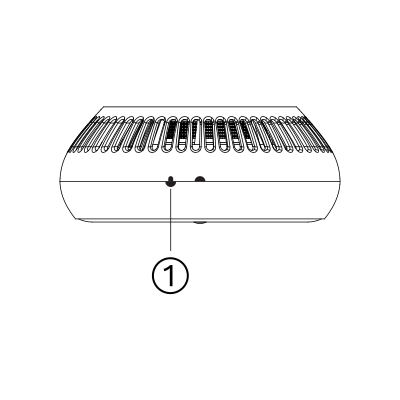
Improperly installed
If the semicircle on the product is aligned with the line on the mounting base to form an arrow, the product is installed improperly
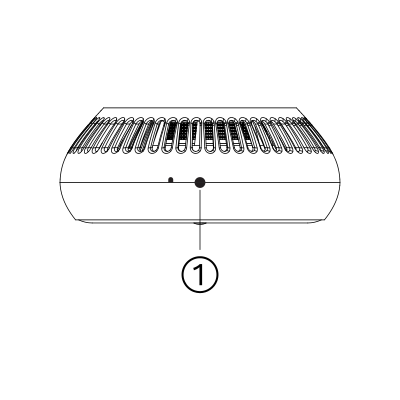
Properly installed
If the semicircle on the product and mounting base are aligned to form a circle, the product is installed properly
9. Fire Alarm Function
When smoke is detected, the device will immediately activate both audible and visual alarm signals.
In the event of a real fire, take appropriate action without delay. For example, call the local fire emergency number or use a fire extinguisher to put out the flames.
If no fire is present, press the mute/self-diagnostic button to silence the alarm.
- The alarm will remain muted for 90 seconds. During this time, no audible or visual signals will be generated. After 90 seconds, the device will automatically return to its normal detection state.
Please note that the product may also generate a false fire alarm if directly exposed to the following:
- Mist from pesticides or cosmetics
- Smoke from cigarettes or incense sticks
- Smoke-type or thermal evaporation-type pesticides
- Cooking smoke or steam
- Condensation
10. Alarm and Test
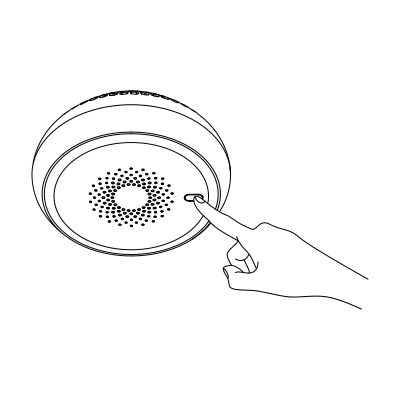
- Detection Mode: When in detection mode, the status indicator blinks red every 50 seconds.
- Self-Check Mode
- To perform a test, press the mute/self-check button. The status indicator will turn red.
- If the button is held for less than 5 seconds, the device will enter self-check mode. In this mode, the status indicator flashes red, and the buzzer will sound (similar to an actual alarm).
- Alarm Activation: When the smoke density reaches the preset alarm threshold, the device will automatically generate an audible and visual alarm.
- Safety Note: During self-check testing, keep a safe distance from the buzzer to avoid potential hearing damage from loud alarm sounds.
- If the product generates an alarm during monitoring, this may indicate a potential risk. Do not ignore the alarm—always try to identify and address the cause.
11. Routine Maintenance
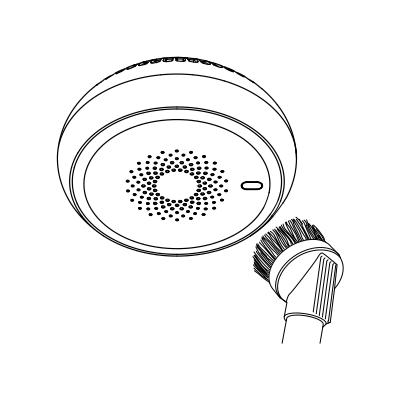
This product is designed to be low-maintenance. To ensure reliable operation, perform the following routine checks:
- Weekly Test: Test the product at least once a week. For detailed instructions, refer to the “Alarm and Test” section.
- Annual Cleaning: Clean the product at least once a year using a vacuum cleaner and a soft brush to remove dust and debris.
12. System requirements
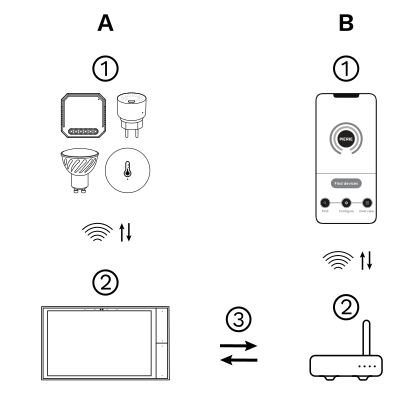
The PIERRE Wave system is a user-friendly solution for integrating and managing smart devices through a central platform. The system consists of the following components:
A - Required Elements:
- PIERRE Wave Products: These smart devices, including lighting, thermostats, sensors, and other appliances, connect wirelessly to the PIERRE Wave Gateway. They provide essential functions and capabilities for the system.
- PIERRE Wave Gateway: The central unit linking all PIERRE Wave devices, the gateway manages communication and data exchange, ensuring security and stability. It supports remote access and control, with the default Berlin display interface, though users can choose any PIERRE display model.
B - Optional Elements:
- Mobile PIERRE App: This app allows users to manage and monitor the system from their smartphone or tablet, offering real-time updates and remote access. It provides convenience but is not necessary for basic system operation.
- Router: An optional component that enables internet connectivity, allowing devices to be accessed and controlled remotely.
- System Operation: The gateway can connect to the router via Wi-Fi or LAN for internet connectivity, enhancing remote management capabilities. PIERRE Wave products communicate wirelessly with the gateway, which acts as the central hub. This bidirectional communication allows data to flow both ways, enabling users to send commands and receive status updates through the Mobile PIERRE App. The app facilitates effective management and real-time feedback on device statuses.
13. App-to-Device Pairing
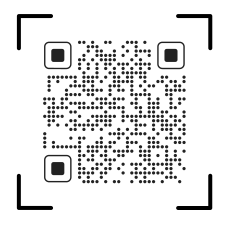
Please scan the QR code to download PIERRE application
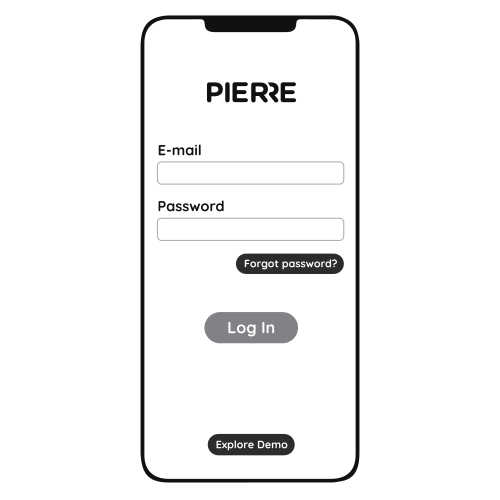
Log in with you Username and Password
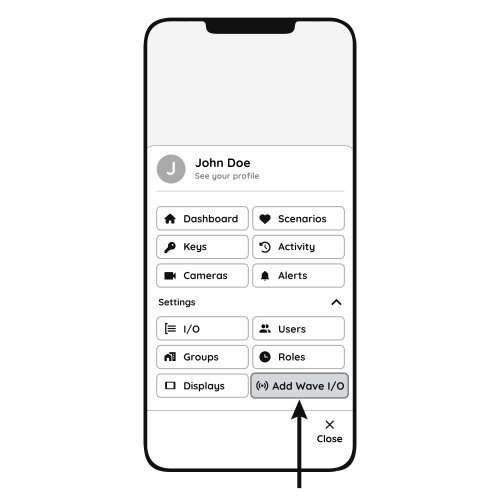
Open Settings and press "Add Wave I/O"

Press the reset button for 5 seconds and release it. The green LED will begin flashing, indicating that the device is ready for network configuration.
- Smoke Detector
- PIERRE Wave Gateway
Network Configuration Notes
- Press and hold the reset button for 5–10 seconds to start network setup.
- While holding, the red LED will turn on.
- After 5 seconds, the red LED will switch off and the green LED will turn on.
- Release the button, and the green LED will flash to show that the device is entering network configuration mode.
- If the network setup is successful:
- The green LED will stay on for 5 seconds, then turn off.
- The device will enter normal network monitoring mode.
- If the network setup fails within 60 seconds:
- The yellow LED will stay on for 5 seconds, then turn off.
- The device will switch to standalone working mode.
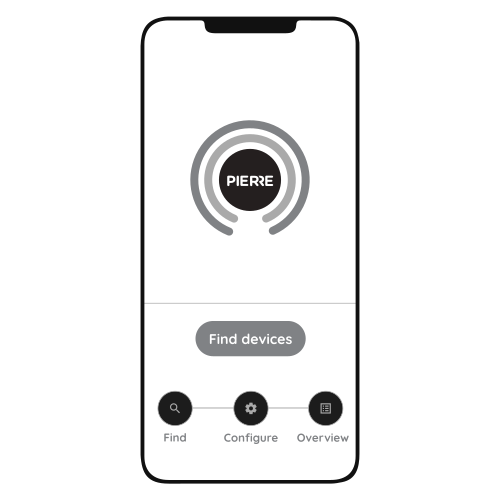
Press "Find Devices"

PIERRE application will show the list of available devices. Press "Add found devices"

Enter Name, Role and Group settings and Save it

When the Light indicator stops flashing, the PIERRE Wave pairing process is finished
14. FAQ
Q1: The product does not respond. What should I do?
A: Check whether the device is correctly mounted onto the mounting base.
Q2: The product beeps intermittently (about every 40 seconds). What does this mean?
A: This indicates that the battery level is low. Replace the battery within one week.
Q3: Why does the product often trigger alarms when there is no fire?
A: Try relocating the smoke alarm, as its current position may be causing false alarms.
Q4: The product frequently sounds alarms even when there is no fire or smoke. How can I fix this?
A: Clean the device thoroughly or reinstall it in another position to reduce false alarms.