
Flat Series 3 Gang Light Switch - Black (no Neutral)

| SKU | PW-SWI-L-3G-L-BLK-F |
|---|---|
| Product line | PIERRE Wave |
| Category | Wall Switches / Flat Series |
| Manufacturer | Keeper |
| Manufacturer SKU | TY-ZL-UN-L3.1 |
| GTIN / EAN | 8606034720772 |
| HS code | 8536508000 |
Overview
The PIERRE Wave - Flat Series 3 Gang Light Switch (no Neutral) controls three independent lighting circuits from one plate, and from the PIERRE system.
It runs without a neutral conductor, which is what makes it a retrofit switch: in older properties the switch drop is usually a single live, and a switch that demands a neutral cannot be fitted without rewiring back to the ceiling rose. It will accept a neutral where one is present, which allows very small loads or no load at all on a channel.
Running from 100-240 V AC 50/60 Hz, it is rated 16 A, with each channel switching 5-500 W for incandescent, 5-150 W for compact fluorescent and 5-150 W for LED lighting. On a no-neutral circuit the LED minimum matters as much as the maximum — very low loads may need a bypass.
It communicates over PIERRE Wave (Zigbee 3.0, 2.4 GHz) and repeats for other PIERRE Wave devices. Standby consumption is 0.3 W.
The front is tempered glass in black, mounting to a 80x80 mm box with 60 mm fixing centres.
Key features
- Three-channel lighting switch, no neutral required
- Maximum current 16 A
- 5-500 W INC, 5-150 W CFL and LED per gang
- 100-240 V AC 50/60 Hz
- PIERRE Wave (Zigbee 3.0, 2.4 GHz)
- Tempered glass front, black
Technical specifications
| Certification | |
|---|---|
| CE Marking | Yes |
| RoHS Compliant | Yes |
| Warranty | 2 years |
| Control | |
| Number of Channels | 3 channels |
| Electrical | |
| Power Supply | 100-240V AC 50-60Hz |
| Power Consumption | 0.3 W |
| Current | 16.0 A |
| Max Load | 5-500W/gang (INC); 5-150W/gang (CFL); 5-150W/gang (LED) |
| Environmental | |
| Operating Temperature | +32°F - +104°F |
| Operating Temperature (°C) | 0 - +40 |
| Operating Humidity | ≤ 80 % RH |
| IP Rating | IP20 |
| Features | |
| LED Indicators | Yes |
| Physical | |
| Width | 86 mm |
| Height | 86 mm |
| Depth | 35 mm |
| Weight | 140 g |
| Panel Material | Tempered glass |
| Product Color | Black |
| Mounting Type | Wall mount |
| Mounting Box | 80x80mm |
| Bolt Hole Distance | 60 mm |
| Wiring Requirements | L - Live |
| Connectivity | |
| Connectivity | Zigbee |
Physical & packaging
| Dimensions (L × W × H) | 86 × 35 × 86 mm |
|---|---|
| Weight | 143 g |
| Box dimensions (L × W × H) | 106 × 50 × 106 mm |
| Box weight | 229 g |
User manual
1. System requirements
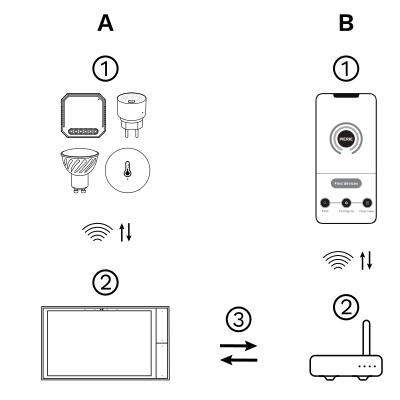
The PIERRE Wave (Zigbee 3.0, 2.4 GHz) system consists of the following components.
Required
- PIERRE Wave products: switches, modules, sensors, thermostats and other devices. They connect wirelessly to the gateway.
- Gateway: a PIERRE display and/or gateway. It links all PIERRE Wave devices and handles the communication with the app.
Optional
- Smart PIERRE app: control and monitoring from a smartphone or tablet. Not required for basic operation.
- Router: gives the gateway internet access for remote control.
Operation: the gateway connects to the router by Wi-Fi or LAN. PIERRE Wave products communicate wirelessly with the gateway in both directions: commands are sent and status updates are received through the Smart PIERRE app.
What you need
A PIERRE Wave (Zigbee 3.0, 2.4 GHz) gateway: a PIERRE display and/or gateway.
2. Wiring
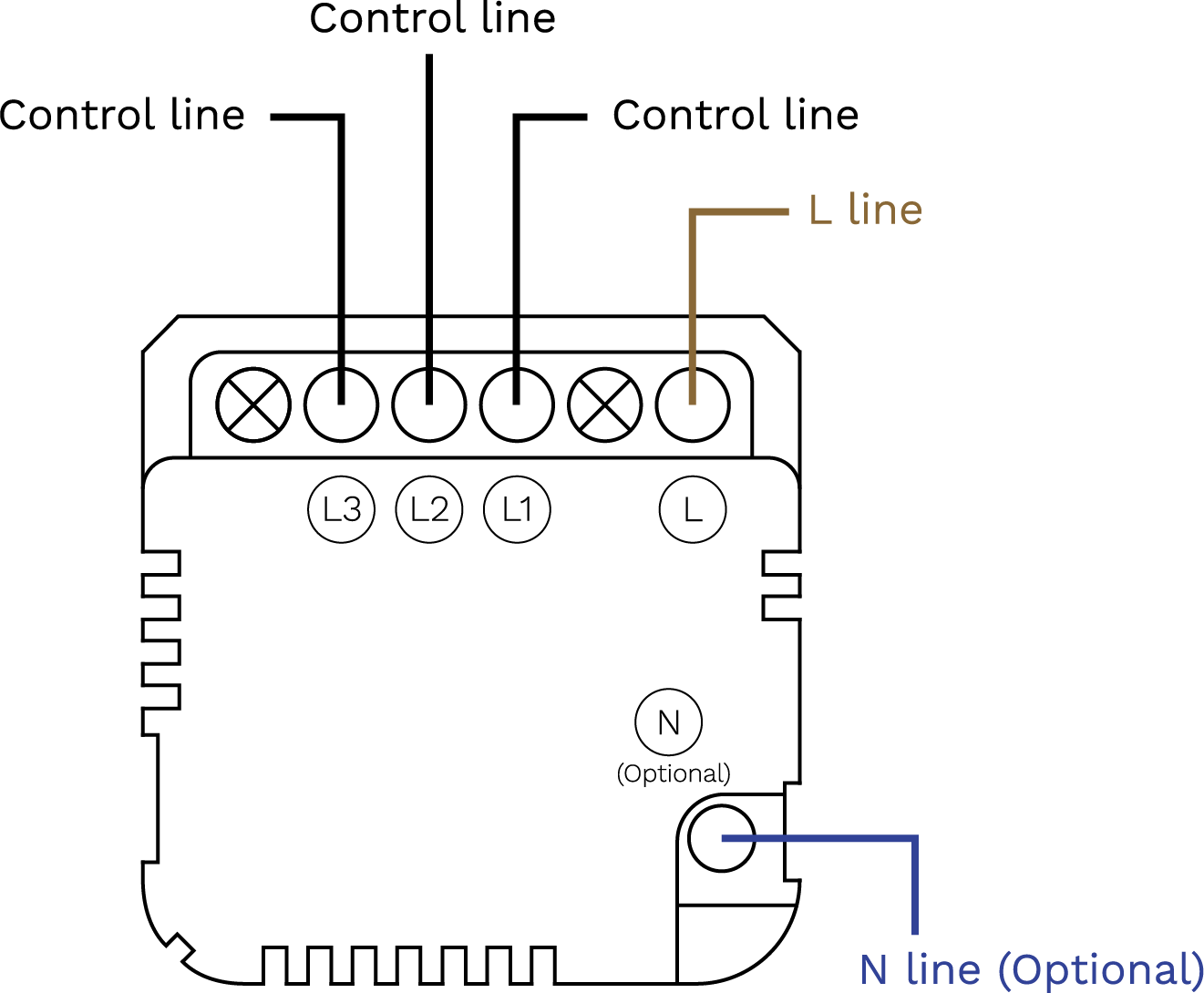
3 Gang Light Switch Wiring (no neutral)
| Run | Wires | Cross-section | Cable type | Conductors |
|---|---|---|---|---|
| From Electric box to Light switch | 1 | 1.5 mm² | NYM-O | L (no neutral at the switch; the neutral runs from the electric box directly to the lamp) |
| From Light switch to lamps | 3 | 1 mm² | NYM-O | L1, L2, L3 (switched lines) |
3. App-to-Device Pairing
Scan the QR code to download the Smart PIERRE app.
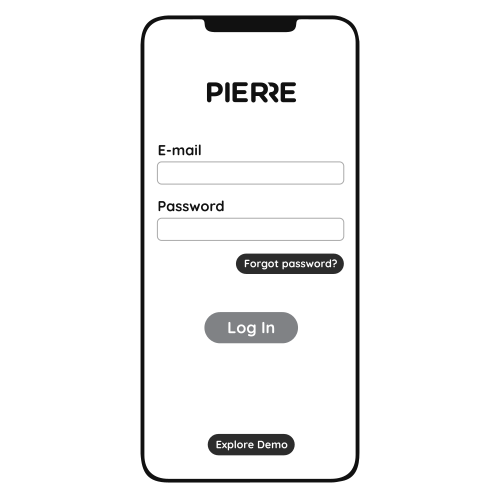
Log in with your Username and Password
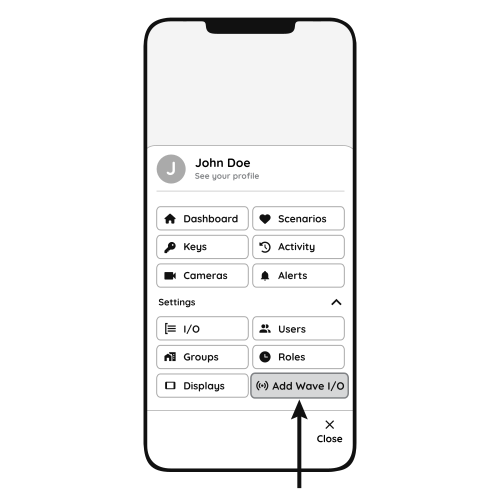
Open Settings and press "Add Wave I/O"
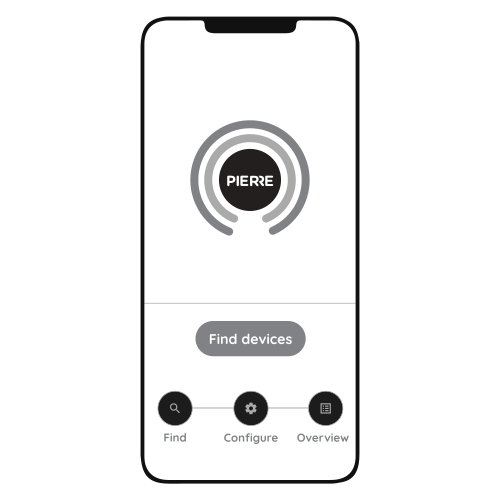
Put the switch into pairing mode: press and hold the Reset Key for 10 seconds (use a small, thin object such as a paperclip) until the indicator light starts flashing.
Press "Find Devices".
The app shows the list of available devices. Press "Add found devices".
Enter Name, Role and Group and press Save.
When the indicator light stops flashing, the pairing process is finished.
4. Video
How to install and configure a PIERRE Wave light switch (the video shows the two-gang model; the steps are the same for the 3 gang model; the no-neutral wiring differs, see the Wiring section). https://www.youtube.com/watch?v=zXz-0DQyTSo
Variants
- Flat Series 1 Gang Blind/Curtain Switch - Black (L+N) — 1 Gang Blind, L+N PW-SWI-B-1G-NL-BLK-F
- Flat Series 1 Gang Dimmer Switch - Black (L+N) — 1 Gang Dimmer, L+N PW-SWI-D-1G-NL-BLK-F
- Flat Series 1 Gang High Consumer Switch - Black (L+N) — High Consumer, L+N PW-SWI-HC-1G-NL-BLK-F
- Flat Series 1 Gang Light Switch - Black (L+N) — 1 Gang Light, L+N PW-SWI-L-1G-LN-BLK-F
- Flat Series 1 Gang Light Switch - Black (no Neutral) — 1 Gang Light, L PW-SWI-L-1G-L-BLK-F
- Flat Series 2 Gang Blind/Curtain Switch - Black (L+N) — 2 Gang Blind, L+N PW-SWI-B-2G-NL-BLK-F
- Flat Series 2 Gang Light Switch - Black (L+N) — 2 Gang Light, L+N PW-SWI-L-2G-LN-BLK-F
- Flat Series 2 Gang Light Switch - Black (no Neutral) — 2 Gang Light, L PW-SWI-L-2G-L-BLK-F
- Flat Series 3 Gang Light Switch - Black (L+N) — 3 Gang Light, L+N PW-SWI-L-3G-LN-BLK-F