Room Service
Description
Room Service tracks and manages room-specific tasks — cleaning requests and guest preferences such as Do Not Disturb — so staff can see the state of every room without entering it.
What It Covers
- Cleaning requests raised by the guest.
- Do Not Disturb status set by the guest.
- The current status of each room, visible centrally to staff.
- Notifications to staff when a request is raised.
How the Guest Uses It
The guest activates or deactivates a service from the Smart PIERRE application, or from the panel in the room. With a compatible hospitality RFID reader, the status is also shown outside the door.
Technical Notes
- Agree the room numbering and the service workflow with the operator before commissioning; the configuration is built against it.
- Decide which staff roles receive which notifications, so a cleaning request does not go to everyone.
- Test a full cycle before handover: request raised in the room, status visible outside the door and centrally, and cleared correctly afterwards.
Key Features
- Room Service Dashboard: Displays all rooms categorized by status: All, Room Cleaning, and Do Not Disturb. Each room card shows the room number, current status, and the last cleaning timestamp for quick task prioritization.
- Room Details View: Offers detailed information for each room, including guest name, check-in/check-out times, reservation number, room status, and recent activity. Action buttons like "Mark as Cleaned" and "Cancel Request" allow for real-time updates and task management.
Why It’s Ideal for All Property Hosts
- Operational Efficiency: Centralizing room tasks ensures that staff can quickly identify priorities, avoiding delays or duplicate efforts.
- Enhanced Guest Experience: The system ensures guest preferences, such as "Do Not Disturb," are respected, leading to higher satisfaction and fewer complaints.
- Real-Time Updates: Staff can easily log completed tasks, keeping all teams informed and ensuring accurate records.
- Simplified Task Management: Filters and categorized views help staff focus on specific tasks, such as rooms needing cleaning, making workflows more streamlined.
This system simplifies task allocation, improves communication between staff, and ensures guest preferences are respected, making it an essential tool for maintaining high standards of service in accommodations.
Room Service in the PIERRE App
The Room Service module provides an easy and efficient way to manage cleaning and “Do Not Disturb” requests in real time. It offers a clear overview of room statuses and quick access to essential actions, helping staff stay organized and respond promptly to guest needs.
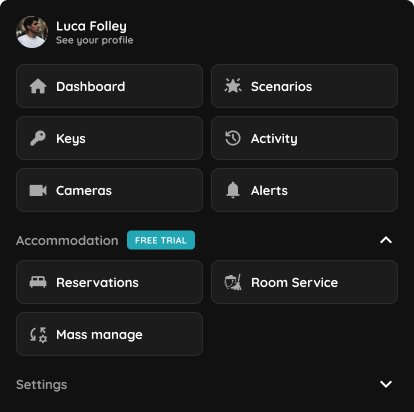
Step 1
Open the Menu, then under the Accommodation section, select Room Service.
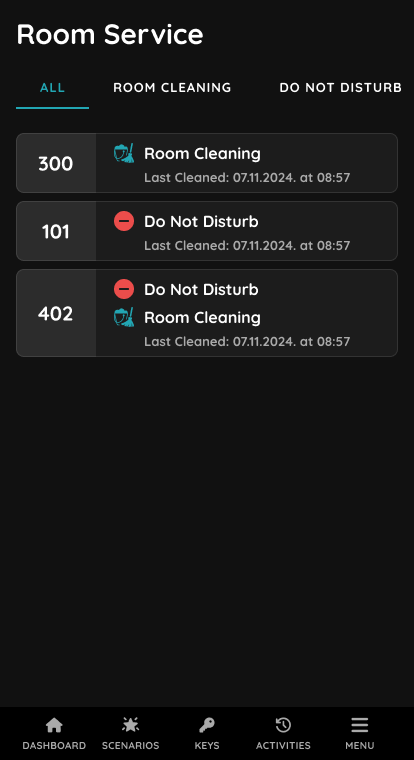
Step 2
This screen shows the All tab of the Room Service module.
It lists all rooms along with their current housekeeping status, such as “Room Cleaning” or “Do Not Disturb,” as well as the last cleaned date and time. The broom icon indicates that the room requires cleaning, while the Do Not Disturb icon signals that staff should not enter. This view helps the team organize daily cleaning tasks and respect guest preferences in real time.
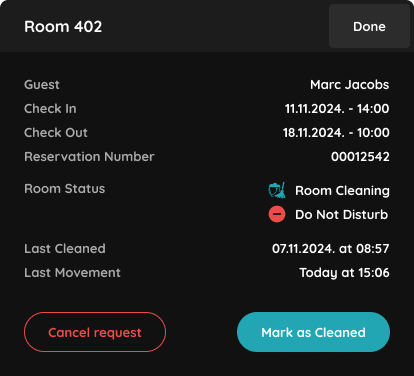
Step 3
This screen shows the detailed view of a specific room in the Room Service module.
It displays guest information, including name, check-in and check-out dates, and reservation number. The current housekeeping status is shown with icons — the broom icon indicates the room requires cleaning, while the Do Not Disturb icon signals that staff should not enter. Additional details include the last time the room was cleaned and the most recent movement recorded. From here, staff can cancel the current request or mark the room as cleaned, helping streamline housekeeping operations and maintain guest comfort.