Solution - Gates Control
Description
A compatible motorized gate can be integrated into the PIERRE system through the gate operator's external control input.
In a typical integration, a PIERRE Controller controls a relay whose potential-free contact is connected to the gate operator's dry-contact trigger input. The PIERRE system therefore sends the same type of command as a conventional wall-mounted push button, key switch, or other external control device.
The gate operator remains responsible for controlling the motor, movement, end positions, and its own safety functions.
How the Control Works
-
The relay's COM and NO contacts are connected to the appropriate external control input of the gate operator.
-
The PIERRE Controller activates the relay using its control output.
-
The relay momentarily closes the potential-free contact, sending a command to the gate operator.
-
The gate operator receives the command and performs the corresponding movement according to its own configuration.
Depending on the gate operator, a single input may be used for sequential commands such as Open → Stop → Close, while other operators may provide separate inputs for Open, Close, or other functions.
The exact control method must always be verified in the gate operator manufacturer's documentation.
Ways to Control the Gate
Depending on the PIERRE system configuration, the gate can be controlled using different access methods.
Smart PIERRE Application
Authorized users can operate the gate from the Smart PIERRE application.
The gate can also be made available through the Keys section for users who have the appropriate access permissions.
If physical gate status is required in the application, appropriate feedback must be provided, for example through a magnetic contact or a compatible end-position signal.
Without physical feedback, the system can know that a command was sent but cannot reliably confirm that the gate actually reached the open or closed position.
RFID Card or PIN
A compatible PIERRE RFID/PIN access control device can be used to trigger gate opening for authorized users without requiring a smartphone.
License Plate Recognition
If a compatible license plate recognition system is integrated with PIERRE, a pre-authorized vehicle can trigger gate opening based on its registered license plate.
The exact functionality depends on the installed license plate recognition system and its integration with PIERRE.
Power Failure and Emergency Access
The gate operator's manufacturer-specified manual or emergency release mechanism must remain available and must not be replaced or bypassed by the PIERRE system.
If gate operation is required during a mains power failure, backup power must be designed for all equipment required for the intended function, including the gate operator and any necessary PIERRE or access-control equipment.
Backup power requirements depend on the gate operator, system architecture, connected devices, and required operating time.
Technical Notes
-
Before connection, verify the gate operator's external control interface and identify the correct trigger terminals according to the manufacturer's documentation.
-
If the gate operator requires a potential-free / dry-contact input, no external voltage may be applied to that input unless explicitly specified by the manufacturer.
-
The relay command should follow the pulse duration required by the gate operator. Do not assume that a permanently closed contact is permitted.
-
Verify whether the operator uses a single sequential trigger input or separate Open / Close / Stop inputs.
-
The gate operator's own end limits, photocells, safety edges, obstacle detection, motor protection, and other required safety functions must remain connected to and managed by the gate operator.
-
PIERRE must not replace, bypass, or disable manufacturer-required gate safety functions.
-
Physical Open / Closed status in PIERRE requires appropriate feedback from the gate or gate operator.
-
Installation and wiring must follow the gate operator manufacturer's documentation, PIERRE technical documentation, and applicable electrical and gate-safety requirements.
Schemes - Gate motor control with phase switching
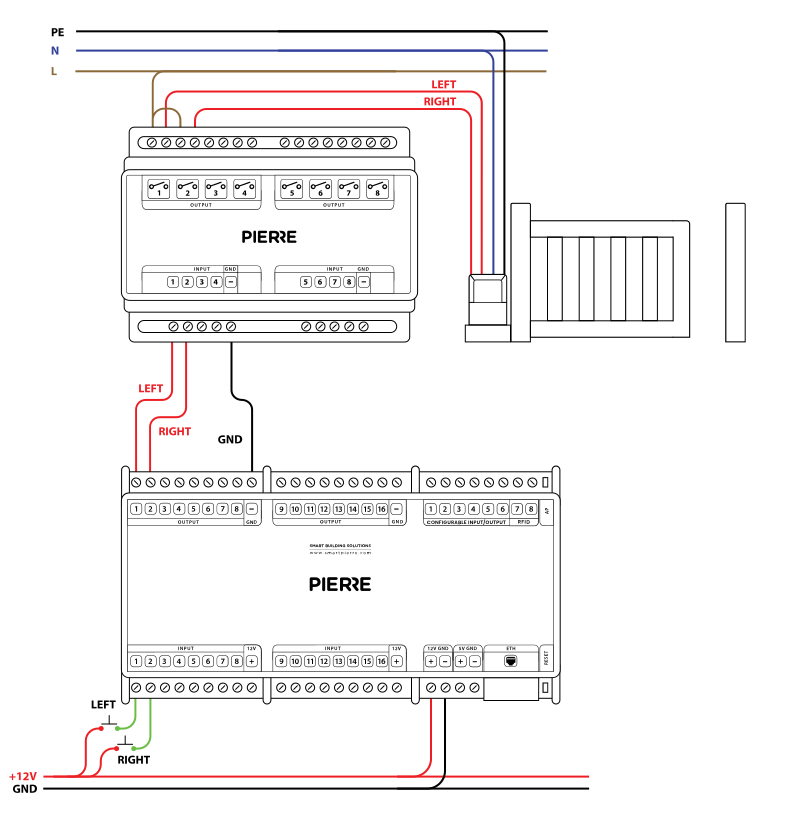
Wiring Gates with two way signal - Electric schemes
Schemes - Gate control with dry contact via gate control module
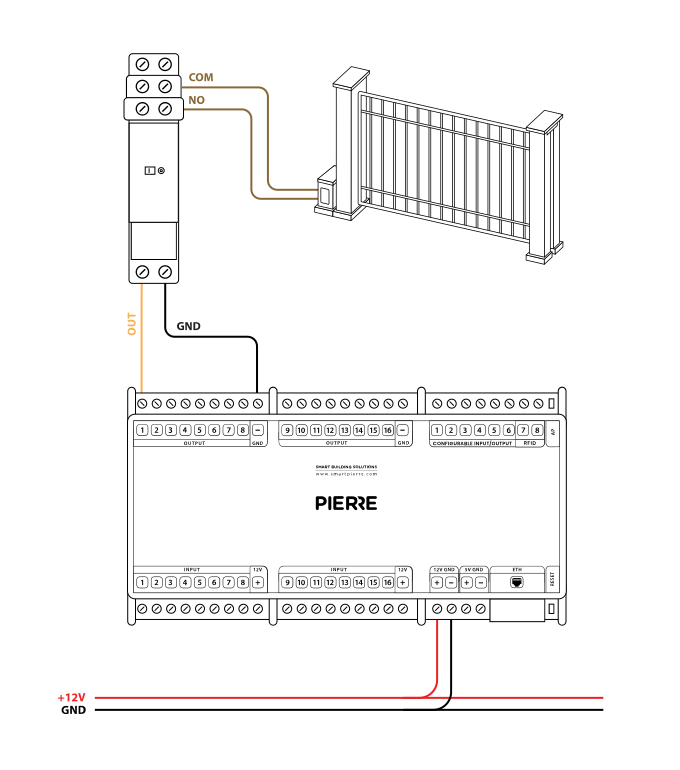
Wiring Gate control - dry contact - Electric schemes
Cables - Gate motor control with phase switching
| Position | Wires | Diameter | Type | Comment | REQUIREMent |
|---|---|---|---|---|---|
| From Relay to Gate | 4 | 1.5 mm² | H07V-K | L1, L2, N, PE | |
| From Button to PIERRE controller | 3 | 0.5 mm² | Cat5 UTP | +12V, LEFT, RIGHT | Optional |
| From PIERRE to Relay | 3 | 0.75 mm² | H07V-K | OUT1, OUT2, GND |
Cables - Gate control with dry contact via gate control module
| position | wires | diameter | type | comment |
|---|---|---|---|---|
| From PIERRE controller to Relay | 2 | 0.75 mm² | H07V-K | OUT, GND |
| From Relay to Gate controller | 2 | 0.5 mm² | Cat5 UTP | COM, NO |
Troubleshooting
Green – Online: the controller is connected to the network and operating normally. Red – Offline: the controller is disconnected from the network, or there is no internet access. White – Commissioning: the controller has started in commissioning mode and is waiting to be commissioned. Light blue – AP mode: the controller is broadcasting its own network for setup or configuration. Dark blue – Selected in the app: the controller is currently selected in the PIERRE Partner app, which helps you identify the physical controller in the cabinet. Purple – Searching for IP address: the controller is waiting to receive an IP address from the router. Orange – Firmware update: a firmware update is in progress; do not power off the controller while the LED is orange.
Mount the sensor so that it closes when the door or gate is fully closed. The sensor only distinguishes closed from not closed, so a half-open door is reported as open — which is what you want to know.
If not, wire it as shown in the diagram.
If not, connect it: the relay contact replaces the gate's push button.
Disconnect the wire between the mechanical relay and the controller output and briefly connect it to +12 V. If the gate opens, everything after the controller works. Alternatively move the wire to another free output and change the pin in the PIERRE Partner app.
Install a Contact sensor on the gate to monitor its status in the PIERRE app. Some gate motors also provide status information.
Gate motors and locks can be backed up by battery power, allowing them to function during outages. Additionally, it's always recommended to have manual operation options.