Solution - Irrigation Valve Wiring
Description
Irrigation valves are the switched outputs of an irrigation system. They are driven through a solid state relay (SSR) board connected to a PIERRE Pro or Lite controller, so each zone can be opened and closed independently.
Connection
- The valves connect through a 4-channel or 8-channel SSR board.
- The board is driven by the controller, one channel per valve.
- Plan the channel count from the number of zones, with reserve.
Voltage
- 12V valves can be connected directly to the controller.
- 24V valves need more power than the controller can supply. They require an additional power supply and a relay. This is a physical limitation, not a configuration option.
Check the valve voltage before planning the cabinet, because it decides whether an extra supply and board have to fit in it.
Automation
- Scheduled watering per zone.
- Watering released or blocked by a soil moisture sensor.
- Watering stopped by a rain sensor.
Technical Notes
- Run each zone as its own output. Valves opened together share the water pressure, and a system designed for one zone at a time will underperform if two open.
- Use outdoor-rated cable to the valve boxes and protect the connections from standing water.
- Label the zones at the board during installation; identifying which channel feeds which part of the garden afterwards means switching them one by one.
- Keep a manual valve available so the system can be watered or isolated without the controller.
Schemes
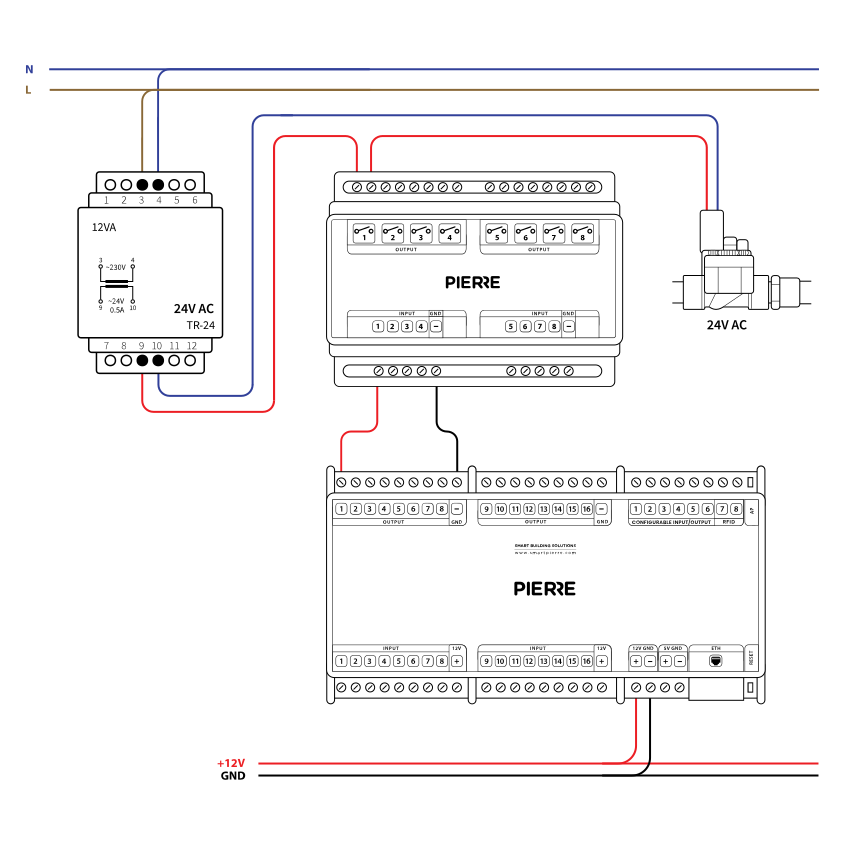
Wiring Irrigation in the PIERRE smart home system - Electric schemes
Schemes
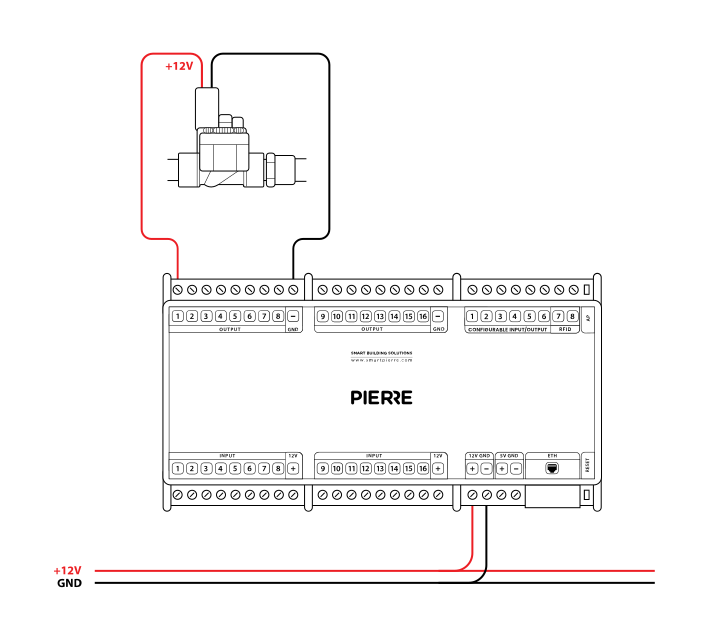
Wiring 12V Irrigation in the PIERRE smart home system - Electric schemes
Schemes
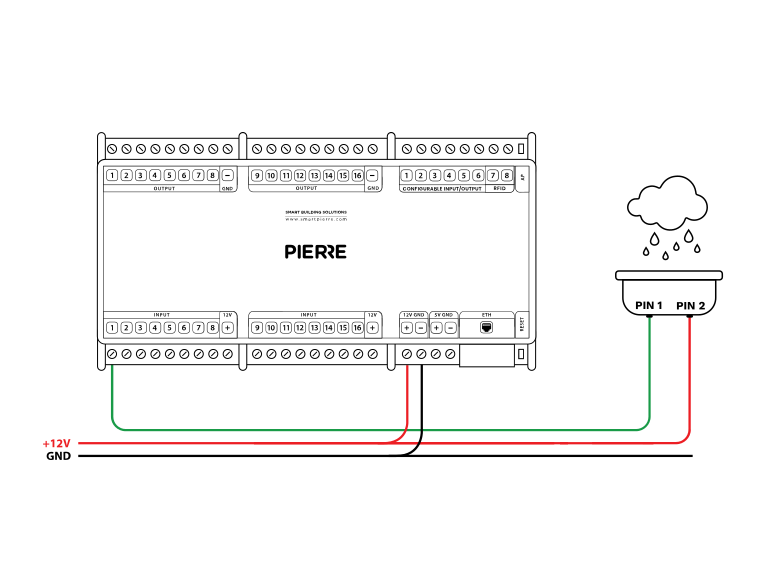
Wiring Compatible Rain sensor in the PIERRE smart home system - Electric schemes
Cables
| Position | Wires | Diameter | Type | Comment |
|---|---|---|---|---|
| From relay to Valve | 2 | 1.5 mm² | NYM-O | L, N |
| From PIERRE Controller to relay | 2 | 0.75 mm² | H07V-K | GND, OUTPUT |
Troubleshooting
Green – Online: the controller is connected to the network and operating normally. Red – Offline: the controller is disconnected from the network, or there is no internet access. White – Commissioning: the controller has started in commissioning mode and is waiting to be commissioned. Light blue – AP mode: the controller is broadcasting its own network for setup or configuration. Dark blue – Selected in the app: the controller is currently selected in the PIERRE Partner app, which helps you identify the physical controller in the cabinet. Purple – Searching for IP address: the controller is waiting to receive an IP address from the router. Orange – Firmware update: a firmware update is in progress; do not power off the controller while the LED is orange.
If not, add it in the PIERRE Partner app.
If not: check the polarity of the GND and OUTPUT wires at the relay coil; they may be reversed. To rule out a relay fault, feed 12 V DC from the power supply directly to the relay coil input instead of the controller output.
If not, check every connection on the relay: is the line (L) connected, and are the right wires on the relay terminals?
Most projects use Hunter 24 V AC irrigation valves. They need a 24 V AC transformer; the controller switches them through a relay output.