
Solution - Rain Sensor
Description
The Rain Sensor can be integrated into the PIERRE system using a dry-contact output or relay-based signal. Any rain sensor that provides a compatible contact output can be connected to a PIERRE controller input, enabling weather-based automations and protective functions.
Key Features
Dry-Contact Integration
-
The rain sensor is connected to a PIERRE controller input through a dry-contact or relay output.
-
The controller monitors the contact status and can trigger predefined actions when rain is detected.
-
Multiple rain sensor models can be integrated, provided they offer a compatible contact output.
Irrigation Control
-
Rain detection can automatically suspend irrigation systems to prevent unnecessary watering.
-
This helps reduce water consumption and improves the efficiency of landscape irrigation.
Protection of Openings and Outdoor Equipment
-
The system can automatically close motorized windows, skylights, doors, shutters, or awnings when rain is detected.
-
This functionality helps protect the building and outdoor areas from weather-related damage.
Automation Integration
-
The rain sensor can be used as a trigger in automation rules and scenarios.
-
Actions can be combined with other conditions, sensors, schedules, or weather-related logic to create advanced automation workflows.
System Operation
When rain is detected, the sensor changes the state of its dry-contact output. The PIERRE controller receives this signal and executes the configured actions or automation rules. When the rain condition clears, the system can either return to normal operation automatically or wait for user-defined conditions, depending on the project configuration.
Schemes
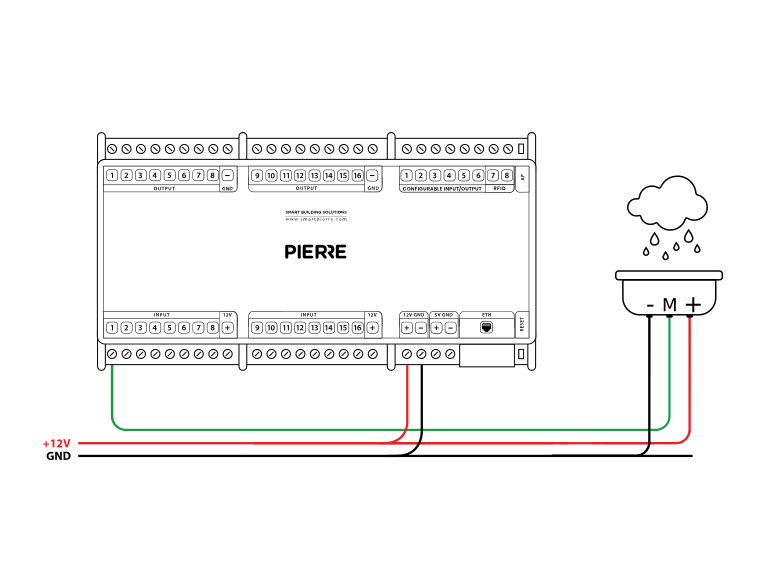
Wiring Compatible Rain sensor in the PIERRE smart home system - Electric schemes
Schemes
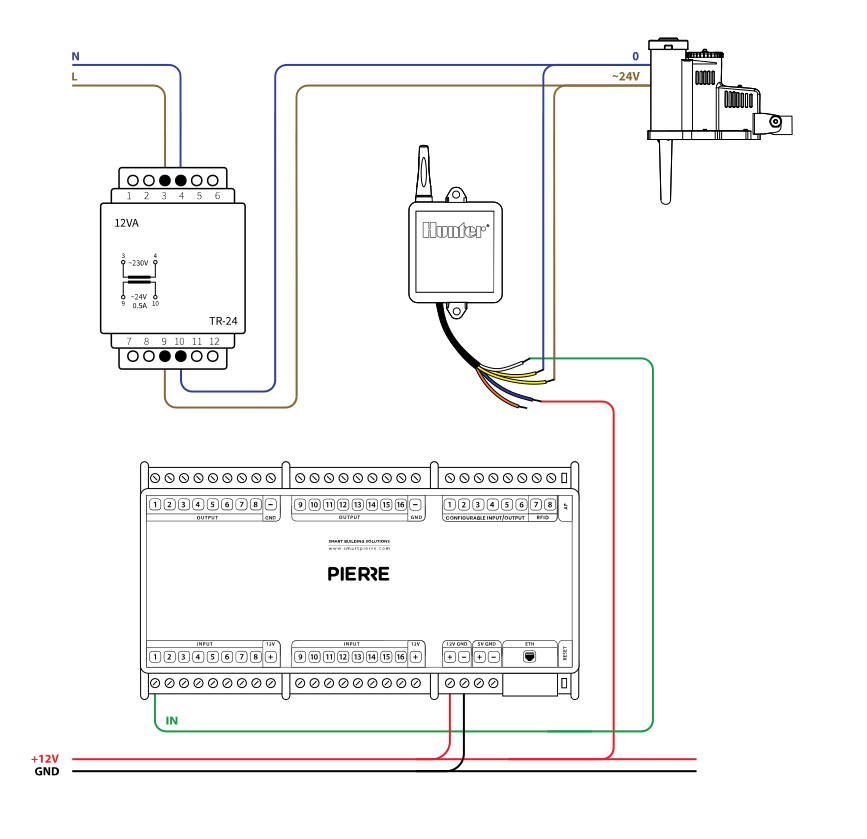
Wiring Hunter Wireless Rain-click sensor - Electric schemes
Cables
| Position | Wires | Diameter | Type | Comment |
|---|---|---|---|---|
| From TR-24 transformer to Rain sensor | 2 | 0.75 mm² | H07V-K | 12/24V DC, GND |
| From Rain sensor to PIERRE controller | 3 | 0.75 mm² | H07V-K | IN, GND, 12V |
| From Power supply to Controller | 2 | 0.75 mm² | NYM-J | 12V, GND, DC |
Troubleshooting
Green – Online: the controller is connected to the network and operating normally. Red – Offline: the controller is disconnected from the network, or there is no internet access. White – Commissioning: the controller has started in commissioning mode and is waiting to be commissioned. Light blue – AP mode: the controller is broadcasting its own network for setup or configuration. Dark blue – Selected in the app: the controller is currently selected in the PIERRE Partner app, which helps you identify the physical controller in the cabinet. Purple – Searching for IP address: the controller is waiting to receive an IP address from the router. Orange – Firmware update: a firmware update is in progress; do not power off the controller while the LED is orange.
If not, add it in the PIERRE Partner app.
If not: Give it a try. If the sensor has been newly added, it needs a state change.
If not, wire it as shown in the diagram. To rule out the device and its cable, briefly bridge the controller's 12 V output to the input the device is wired to. If the input turns green in the app (or the connected output switches), the controller and the input are fine and the fault is in the device or its cable.
When an input triggers an output — for example a motion sensor that switches a lamp — add both to the same controller. This gives the fastest response.
Each sensor (motion, light, contact, etc.) is wired individually to the PIERRE distribution cabinet in a star topology. • INPUT 12–24 V – 12 V DC from the PIERRE controller • GND – GND from the PIERRE controller • Switch K1 – to INPUT 12–24 V • Switch K2 – to a digital input of the PIERRE controller